

The first line of defence against malware is culture, not technology. Basic ways of protection for institutions and individuals, from security policies to choosing an antivirus.
While we enjoy the blessings of living in the digital age, the likelihood of our encountering certain threats is increasing every day. Technical and technological developments also open up a wide field of action for ill-intentioned people in the attacks they can carry out. There are important measures that can be taken to cope with this negative situation.
First of all, security policies, security procedures and security plans should be created at the institutional level. This should be made a culture within the institution. All employees of the institution should be made aware by ensuring that they receive the necessary training in cybersecurity. These measures should be taken both at the enterprise or business level and at the individual level. In this article, after brief information on the technical institutional measures, personal measures and the features of antivirus software will be examined. In this regard, the types of antivirus programs, how they work, their shortcomings and selection criteria will be discussed.
The technical measures that can be taken institutionally to ensure network security can be listed as firewall, VPN (virtual private network), antivirus, IDSs (Intrusion Detection Systems), URL filtering and strong authentication. Factors such as daily backup and keeping systems up to date can be added to these measures.
These systems are used on an institutional scale and protect computer systems and networks against malware, or in other words against attacks and intrusions. In this regard, there are also important measures that should be taken individually. The answer to the question of what can be done to protect our existing devices (computers, laptops, tablets, smartphones and so on) is of great importance.
In general, it is very important to update the operating systems and other applications we use and always keep them up to date. We need to download the applications we install on our electronic devices from trusted sources. Apart from these measures, the antivirus programs we choose will provide us with personal security and protection. But what antivirus programs are, how they work and whether they have shortcomings are all questions that need answering.
The general purpose and raison d’être of antivirus software is to protect computers and computer systems from malware, and to that end to detect and destroy malware. Over time and in parallel with technological developments, malware too has undergone great changes. This change has made such software more complex and harder to manage. Today antivirus programs try to identify and eliminate not only viruses but every kind of potential threat.
The effects of malware installed without users’ consent can be summarised as a series of negative effects, such as reducing computer performance, scanning personal data on the system, deleting that data and even adversely affecting the operation of hardware controlled by the computer.
Antivirus software can be divided into two basic categories: signature-based antivirus and heuristic-based antivirus. These different categories can be used to compensate for each other’s missing features and support each other.
Signature-based antivirus software contains a database of the signatures of malware. This database holds the signatures of malicious software. In its working principle, while scanning the system the antivirus compares the malware signatures held in its own library with the entities, software applications or files it is scanning, and detects matches as malware. In other words, the virus must be known to the antivirus program.
Heuristic-based antivirus software, on the other hand, helps software vendors and their customers stay one step ahead by detecting previously unknown viruses and defend against new malware not yet added to the virus definition files. As the definition suggests, heuristic-based antivirus software does not contain, and does not need, any database of viruses when detecting malware. It uses the methods of file analysis, dynamic scanning and genetic signature detection. These techniques can be used to scan and examine both files on storage and files in transit.
After the detection stage, antivirus programs move on to the stage of removing the malware they have found from the system. At this stage the user is offered various options, such as quarantine or deletion.
As can be understood from the explanations above, antivirus software, one of the methods and systems used to protect computer systems, can prove inadequate especially against malware that has become more complex and new forms of which emerge every day. This can also be put as follows: antivirus software cannot detect viruses that are not in the database it holds and uses against malware.
To prevent this drawback, antivirus is constantly updated by the vendors, and newly discovered malware is added to the relevant library. The most important responsibility falling on users to reduce these shortcomings is to always update the antivirus programs they use and keep them up to date at all times.
A second question that can be asked on the subject is which antivirus program should be preferred and which offers better protection. Finding the answer to this question is not at all as easy as it seems. There are, however, some studies, analyses, findings and assessments carried out in the market. The Malware Protection Test results for March 2021 are given in the table below.
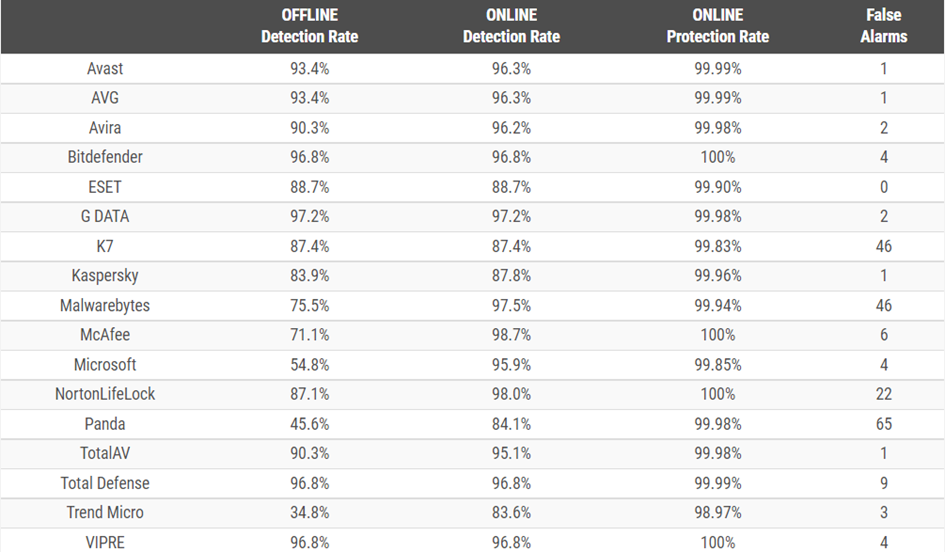
This image shows the offline and online malware detection rates, online protection rates and false alarm rates of the most widely used antivirus programs. When choosing an antivirus, one should look not only at its reliability in protection but also at its performance, and both features should be taken into account at the selection stage. The antivirus programs that can be recommended in this regard are listed below. The list is based on research data, and individual preferences may differ.
Bitdefender: It provides maximum security while using the computer’s resources at a minimum level. Because it combines both features, it can be counted among the first choices.
Avast: It is very popular among individual users. Avast includes many features and offers them to its users free of charge. Free email scanning and internet protection are some of these features.
Kaspersky: It is one of the reliable and practical antivirus programs. Its free version offers services such as protection against phishing, identity theft and ransomware, and banking and shopping security.
Avira: Another performance-friendly program is Avira. Its free version provides protection against email fraud and password phishing.
McAfee: It is a widespread and popular program among individual users. The features offered in its paid version include password management, web security, password storage and PC optimisation.
Monthly · free
Compass of the Month
PUGAT’s monthly newsletter.
Read next



What is PUGAT? A non-profit community publishing independent analysis from Europe on security, migration and society in Turkish, German and English.
Go to the homepage